
7 Simple Habits That Could Damage Your Laptop Screen and Lead to Costly Repairs

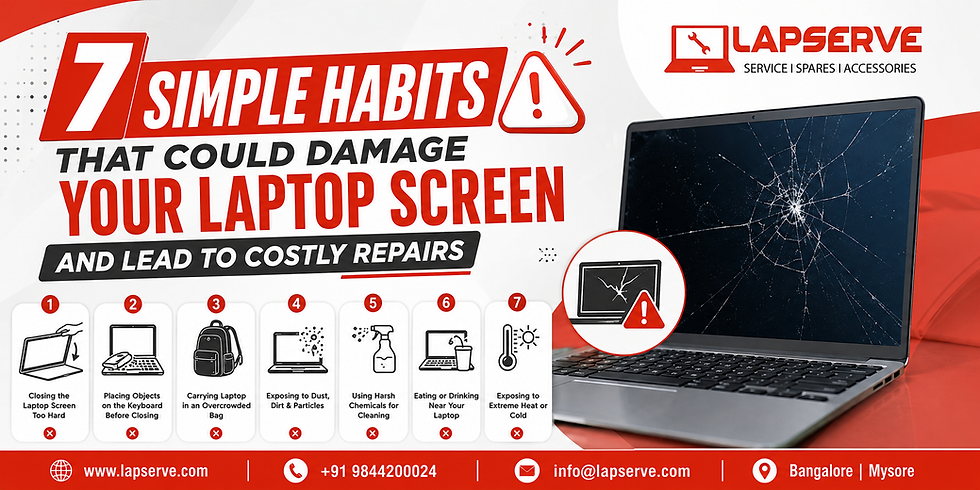
Laptops have become essential for work, education, and entertainment, but their slimmer designs and high-resolution displays also make them more vulnerable to damage. A single crack or display issue can disrupt productivity, making timely laptop screen repair crucial to avoid expensive replacements.
According to IDC's February 2026 PC Market Outlook, global PC shipments are expected to decline by 11.3% in 2026, while PC revenue is projected to grow by 1.6% due to rising component costs. As laptops become more expensive, preventive care and professional laptop screen repair are smarter investments than replacing an entire device.
The good news is that many screen failures are caused by everyday handling habits rather than manufacturing defects. With proper care and early repairs, you can significantly extend your laptop's lifespan and reduce repair costs.
As Benjamin Franklin famously said:
"An ounce of prevention is worth a pound of cure."
Let's explore seven simple habits that could damage your laptop screen and how you can avoid costly repairs.
Why Laptop Screens Are More Fragile Than Ever
Modern laptops feature ultra-thin bezels, lightweight aluminum chassis, IPS and OLED displays, and flexible hinge mechanisms. While these innovations improve portability and viewing quality, they also make screens more vulnerable to accidental pressure, impact, and improper handling.
Latest Laptop Industry Insights (2025–2026)
Industry Insight | Latest Data | Why It Matters |
Global PC shipments (2026) | -11.3% (IDC Forecast) | Higher laptop prices encourage repairs over replacements. |
Global PC revenue (2026) | +1.6% | Rising component costs increase the value of protecting existing devices. |
Devices assessed in the 2026 Failing the Fix report | 105 laptops & smartphones | Consumers increasingly prefer repairable electronics. |
Estimated U.S. electronic waste generated annually | 7+ million tons | Repairing laptops extends device life and reduces e-waste. |
These trends highlight why proper laptop care and timely servicing have become increasingly important in 2026.
Laptop Screen Repair: 7 Everyday Habits That Secretly Damage Your Display
1. Lift It Wrong, Damage Along
One of the most common mistakes users make is lifting or opening a laptop by one corner of the display.
This creates uneven torsional stress across the LCD panel and hinge assembly. Over time, repeated stress may lead to:
Hairline cracks
Loose hinges
Screen flex
Internal LCD damage
Expert Tip: Always lift your laptop using the centre of the lid with both hands to distribute pressure evenly.
2. Close With Objects, Invite the Cracks
Pens, USB drives, earphones, charging cables, or even small coins left on the keyboard can become dangerous pressure points when the lid is closed.
Instead of distributing force evenly, these objects concentrate pressure on a small section of the display, often resulting in internal LCD fractures that may not be immediately visible.
Quick Fact
Laptop Repair Statistics | Latest Estimate |
Screen-related repairs | 18% of all laptop hardware repairs |
Battery + screen repairs combined | Nearly 40% of repair jobs |
These figures demonstrate why protecting the display is one of the simplest ways to avoid expensive repairs.
3. Pack With Slack, Welcome the Crack
Many users place laptops into backpacks alongside books, chargers, water bottles, and accessories without using a padded sleeve.
Continuous pressure during daily commuting can cause:
LCD bruising
Pressure marks
Display discoloration
Internal panel fractures
Backlight damage
Industry repair workshops report that many laptops requiring display repairs are only 3–4 years old, showing that everyday handling often has a greater impact than the age of the device.
Best Practice: Always carry your laptop in a dedicated padded compartment or protective sleeve.
4. Clean Too Mean, Damage Unseen
Using household glass cleaners or spraying liquid directly onto the display can damage anti-glare coatings and allow moisture to seep beneath the bezel.
Instead:
Use a microfiber cloth.
Apply screen-safe cleaning solution to the cloth not directly to the screen.
Wipe gently using minimal pressure.
Avoid using tissues, rough fabrics, or excessive force, as these can scratch the display or create permanent pressure marks.
5. Press Too Hard, Leave a Permanent Scar
Touchscreen laptops are designed for light interaction. Pressing too firmly with fingers, fingernails, pens, or other objects can damage the LCD layers underneath the protective glass.
Common symptoms include:
Bright spots
Pixel distortion
LCD bleeding
Pressure marks
Uneven backlighting
Even repeated pressure during cleaning can gradually weaken the display.
6. Ignore Loose Hinges, Invite Bigger Damage
A loose or overly tight hinge is more than just an inconvenience it can gradually damage your laptop screen. Every time you open or close the lid, uneven hinge tension transfers stress to the display panel, bezel, and display cable.
If left unattended, it can lead to:
Screen flickering
Display cable damage
Cracked LCD panel
Broken hinges
Misaligned display
Pro Tip: If your laptop lid feels unusually stiff or loose, have it inspected immediately. A simple hinge repair today can prevent a costly display replacement tomorrow.
7. Delay Repairs, Multiply Repair Costs
Many users continue working with flickering screens, dead pixels, or display lines, assuming the issue is minor. Unfortunately, small faults often worsen over time.
Common early warning signs include:
Flickering or blinking display
Vertical or horizontal lines
Black spots or LCD bleeding
Dead or stuck pixels
Dim or uneven backlighting
According to the 2026 "Failing the Fix" report by U.S. PIRG, consumers are increasingly choosing repair over replacement as repairability becomes a key purchasing factor. The report estimates that consumers could collectively save US$49.6 billion by repairing electronics instead of replacing them whenever practical. This shift highlights the growing importance of timely diagnostics and professional repairs.
Laptop Screen Replacement: When Is Repair No Longer Enough?
Not every damaged screen requires a complete replacement. Professional diagnostics can often identify whether the issue lies in the display cable, hinge assembly, backlight, graphics circuitry, or LCD panel.
However, a laptop screen replacement becomes necessary when:
The LCD panel is physically cracked.
Large black patches spread across the screen.
Liquid has entered the display layers.
Multiple pressure fractures appear.
The screen remains blank despite the laptop functioning normally.
With laptop prices expected to remain elevated throughout 2026 due to rising component costs, repairing a display at the earliest opportunity can often prevent more expensive hardware failures.
LCD Screen Replacement: Why Professional Diagnosis Matters
An LCD screen replacement should never be based on guesswork. Experienced technicians perform a systematic diagnosis to identify the actual cause of the problem before recommending a replacement.
A professional inspection checks:
LCD panel condition
Display ribbon cable
Graphics chipset output
Backlight functionality
Motherboard display circuit
Hinge mechanism
This ensures customers replace only the faulty component, helping reduce unnecessary repair expenses.
Laptop Screen Damage by the Numbers (2025–2026)
Latest Industry Statistics | Data | Why It Matters |
Global PC shipment forecast (IDC 2026) | -11.3% | Higher device costs make repairs more economical. |
Global PC revenue forecast | +1.6% | Component shortages continue to increase laptop prices. |
Devices reviewed in the Failing the Fix 2026 report | 105 | Repairability is becoming a major buying consideration. |
Estimated consumer savings through repair instead of replacement | US$49.6 Billion | Repairing electronics reduces costs and extends device life. |
Estimated U.S. electronic waste generated annually | 7+ Million Tons | Repairing devices supports sustainability and reduces e-waste. |
Screen-related hardware repairs | Approximately 18% | Display damage remains one of the most common laptop repairs. |
Why Customers Across Bangalore Trust Lapserve for Laptop Screen Repair
When your laptop screen develops a fault, choosing the right repair partner is just as important as fixing the problem itself. Lapserve has established itself as one of Bangalore's trusted laptop service center by combining technical expertise with a transparent, customer-first approach.
Three Convenient Service Centres
Lapserve serves customers through its strategically located branches in:
Ramamurthy Nagar
Whitefield
Sarjapur Road
These centres have earned customer confidence through consistent service quality, positive customer reviews, high repair success rates, and dependable after-sales support.
Complete Transparency from Start to Finish
Unlike conventional repair services, Lapserve maintains complete transparency throughout the repair journey.
Customers benefit from:
Detailed diagnostics
Repair approval before work begins
Transparent pricing
Repair tracking
Genuine spare parts
Clear billing with no hidden charges
Warranty That Builds Confidence
Every eligible repair is backed by:
6 Months Service Warranty
12 Months Accessories Warranty
These warranties reflect Lapserve's commitment to quality workmanship and customer satisfaction.
Conclusion
Laptop screen damage rarely happens overnight. In most cases, it develops gradually because of everyday habits that users overlook. Fortunately, adopting better handling practices and addressing small issues early can significantly extend your laptop's lifespan while reducing repair costs.
Key Takeaways
Open your laptop from the centre of the lid to prevent uneven pressure.
Never close the screen with objects left on the keyboard.
Use a padded laptop sleeve during travel.
Clean your display only with a microfiber cloth and screen-safe cleaner.
Avoid applying excessive pressure while using or cleaning the screen.
Repair loose hinges before they damage the display assembly.
Address flickering, dead pixels, and display lines promptly to avoid expensive laptop screen replacement or LCD screen replacement.
As laptops continue to become thinner, smarter, and more expensive, preventive care is the smartest investment. When professional assistance is needed, choosing an experienced service provider like Lapserve ensures your device receives expert diagnostics, transparent repairs, genuine replacement parts, and dependable warranty support helping you restore your laptop's performance with confidence.




Comments